Aller au contenu principal
Plus d'articles de blog

New: Progress report with colours, dates, and more

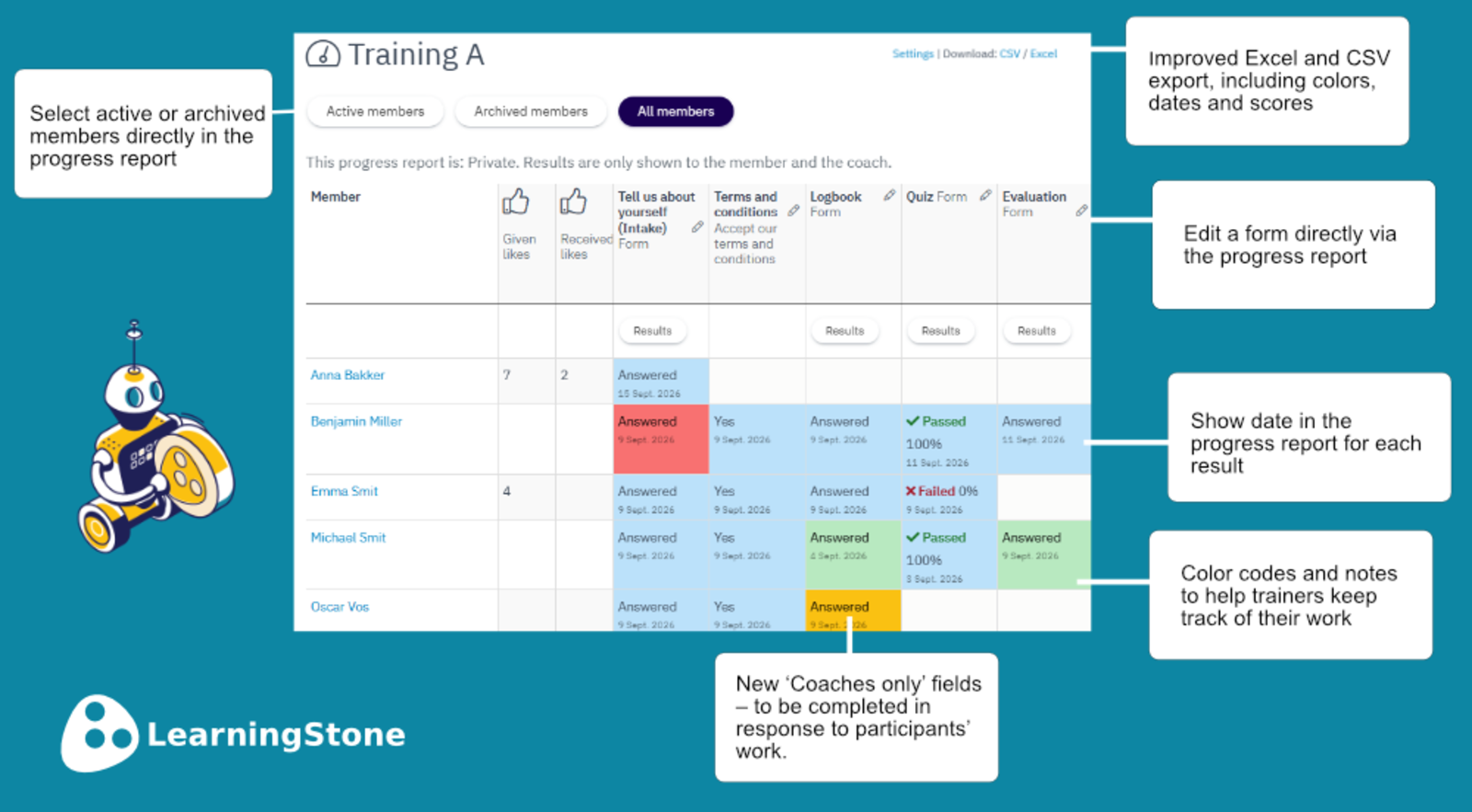
Trainers who actively engage with their groups know this: managing assignments and progress can quickly become a messy hassle that requires keeping track of all sorts of things. LearningStone’s interactive progress report already made things a lot easier, but with the latest release, it gets even better. Read on to learn about dates, custom fields, statuses, colors, and internal notes for trainers and coaches.

LS-Progressreport-EN

The new progress report

ls-yellow horizontal line LearningStone #fac112.png

Why making progress visible matters

Tracking progress is more than just administration - it’s a powerful tool for enhancing learning. Recent research on feedback within organizations shows that the quality and credibility of feedback determine how employees receive and act on it (Zyberaj, 2026). Research on informative feedback for adult learners also demonstrates that feedback providing insight into one’s own progress enhances self-reflection and self-direction (Weidlich et al., 2025). For trainers and coaches, this means: the better you can track and provide feedback on participants’ progress, the greater the chance that learning will actually stick.

Sources:

Zyberaj, J. (2026). Examining the relationship between supervisory feedback characteristics and employee feedback processing: a systematic review and meta-analysis. Current Psychology.

Weidlich, J., Fink, A., Frey, A., Jivet, I., & Drachsler, H. (2025). Highly informative feedback using learning analytics: how feedback literacy moderates student perceptions of feedback. International Journal of Educational Technology in Higher Education.

The development of the revamped progress report is a direct response to questions and suggestions from our users. The idea of using colours came from Paul Driessen of Delphi Mindconnection.

Dates

The progress report already showed that an activity had been completed, but now you can also see at a glance when this happened – for example, when a progress marker was filled in, a quiz was completed or a logbook was last updated. This is visible in the progress report as well as in the updated Excel and CSV exports.

How? The date is recorded for every form, quiz, intake, evaluation and progress marker. This is visible in the progress report. 

Fields for coaches or administrators only

When a participant fills in a logbook or other form, or records activities, you, as a trainer or coach, can view this and add comments (and send an immediate email notification about it). You can now also add a field that only you can fill in and that participants cannot edit – handy!

How? When creating the form: for each field, you can select the new option ‘Only coaches and managers can answer this’.

Statuses and colours

Do you regularly work with the progress report and find that you lose track of what you’ve already done as a trainer? Then the new status feature is a really useful. Each status is assigned its own colour, so you can see at a glance where you’ve got to. For example, select the green status color after you’ve reviewed a logbook and provided feedback – the field will then turn green, or chose orange to remember who you need to follow up with, etc.

How? Click on a result in the progress report.

Internal notes

Is a participant’s progress a bit more complex than a simple status can convey? In that case, keep a note for each progress marker or form. Click on a result in the progress report and you’ll automatically see where you can do this (for example: “25 September 2026: Asked Jan if I could go through his logbook with him”).

How? Click on a result in the progress report.

Please note: if you select the option “Multiple times – each time with new results” in the form settings, the form (e.g. a test) can be completed from scratch. The status colours and internal notes will then be cleared. This does not happen with “Once — edit after submit” or “Once — submit is final".


Intéressé par LearningStone Demandez-nous une visite guidée !
Recevoir des blogs par e-mail ? Inscrivez-vous ici

Read more

Training activity: Summarizing content voor better retention

Blended learning, Learning design, Tips & How to's

After a training session, your head is full. But what actually stays with you? Research consistently shows that active processing - and summarizing in particular - dramatically improves learning…

Plus d'informations sur Training activity: Summarizing content voor better retention

New: Login with Microsoft Entra - SSO for large organizations

Product news, LearningStone

Does your organization or your client’s organization use Microsoft? It is now possible to let participants log in to LearningStone automatically using their own work Microsoft account. No extra…

Plus d'informations sur New: Login with Microsoft Entra - SSO for large organizations

Training activity: Getting to know each other in a blended environment

Blended learning, Learning design, Tips & How to's

Getting to know each other – more than an icebreaker – is important for an entire training. Participants who know each other learn better together, ask questions more readily, and give more honest…

Plus d'informations sur Training activity: Getting to know each other in a blended environment