New: Progress report with colours, dates, and more
Trainers who actively engage with their groups know this: managing assignments and progress can quickly become a messy hassle that requires keeping track of all sorts of things. LearningStone’s…
The final phase of a training is not just a formality. It is the moment where insights crystallize, commitments are made, and participants get a tangible sense of what they have learned and achieved. Yet in practice, the wrap-up often gets squeezed for time: a quick "any last questions?" and everyone heads for the door. A good close is important and LearningStone can help you do it.
This is an article in the "Blended training activities with LearningStone" series of the LearningStone blog - for trainers who want to get more out of their learning environment. Copyright: LearningStone.

Research from cognitive science consistently shows that endings have outsized influence on how an experience is remembered. Psychologist Daniel Kahneman has demonstrated through his "peak-end rule" that people judge experiences largely by how they felt at their most intense moment and at the end - not by the average. A flat or rushed ending can undo hours of excellent training.
More recently, researchers Tannenbaum and Cerasoli (2013, Personnel Psychology) found that structured after-event reviews - debriefs that reflect on what happened and why - significantly improve learning transfer. Similarly, a 2021 meta-analysis in Educational Psychology Review by Adesope, Trevisan and Sundararajan confirmed that retrieval practice at the end of a learning session strengthens long-term retention compared to passive review.
Simply asking participants "what will you take away from today?" is retrieval practice. A self-assessment quiz, a reflection form, or a group discussion at the close of a training all serve the same cognitive function: they force the learner to actively reconstruct what they know - which is far more effective than rereading or re-watching.
The closing is also the moment of highest emotional saliency. Done well, it creates a sense of accomplishment, community, and readiness to apply new skills in the real world.
Sources:
Kahneman, D. (2011). Thinking, fast and slow. Farrar, Straus and Giroux.
Tannenbaum, S.I., & Cerasoli, C.P. (2013). Do team and individual debriefs enhance performance? Personnel Psychology, 66(1), 231-268.
Adesope, O.O., Trevisan, D.A., & Sundararajan, N. (2021). Rethinking the use of tests. Educational Psychology Review, 29(2).
Add a progress conclusion block at the end of your course timeline in LearningStone. This block calculates a score based on the progress markers participants have completed throughout the course - quizzes, self-assessments, reflections - and shows them personalized feedback based on their score range. It is a powerful way to close the loop: participants see not just that they are done, but what they actually achieved. You can add text, images or even a video as the conclusion.
Read more about progress markers and conclusions
Add a certificate generator block to the course timeline and design a certificate with your own logo and background. You can choose to send it automatically on a certain date, or manually select which participants receive it. You can even add a personal message per participant - for example, acknowledging a specific achievement. A certificate turns an abstract learning experience into something concrete and shareable.
Read more about the certificate generator
Build an evaluation form in LearningStone and add it as a block in your course timeline. You can use the simple evaluation example from the content store as a starting point - including a Net Promoter-style question if you want a quick benchmark. The form results are stored per respondent and exportable to Excel or CSV. Close the training by asking participants to fill it in immediately - response rates drop sharply once people leave.
Read more about forms and evaluations
Post a discussion prompt on the prikbord (wall) of the groupspace just before the final session: "What is the one thing you will do differently next week?" Ask participants to respond and react to each other's answers. This creates a sense of collective commitment and allows the group to celebrate each other's intentions. It is low-effort to set up and often produces the most memorable moments of the whole training.
Add a self-grading quiz as the final block in your course timeline. Keep it short - five to ten questions - and make sure the feedback for each question is encouraging and informative, not just "correct" or "wrong." Participants get immediate insight into what they have absorbed, and the act of completing a quiz right before leaving reinforces retention. You can use the quiz progress conclusion to give differentiated feedback based on the final score.
Ask participants to record a short video - on their phone or laptop - in which they answer three questions: what did you learn? Why was it good for you? And how will it help you in your work? This "video interview" format works because it combines retrieval, reflection, and articulation in one go. Saying something out loud forces you to organise your thoughts in a way that writing often does not.
In LearningStone, participants can upload their video directly to their personal folder in Docs, or add it as a content block in the course timeline - whichever setup your training uses. Video files can be uploaded in MP4 format (up to 300 Mb) and will be converted automatically. You can also ask participants to record with a tool like Loom or Vimeo and paste the link into a text block or dialogue. The result is a personal, spoken reflection that participants can revisit later - and that you as a trainer can watch to gauge real understanding and motivation far better than a tick-box evaluation ever could.
Read more about uploading video in LearningStone
Use the automated email block or a personal note in the course timeline to send each participant a message after the training. Merge fields like allow you to address each person by name, and the personal note block lets you add content that is different per person - for example, a tailored next step or a specific compliment. This kind of personal touch stays with participants long after the training ends.
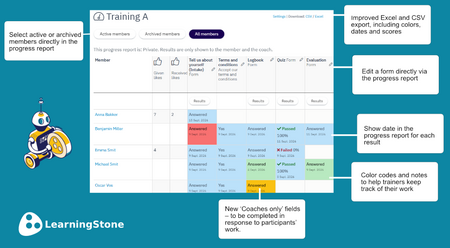
Trainers who actively engage with their groups know this: managing assignments and progress can quickly become a messy hassle that requires keeping track of all sorts of things. LearningStone’s…

After a training session, your head is full. But what actually stays with you? Research consistently shows that active processing - and summarizing in particular - dramatically improves learning…
Does your organization or your client’s organization use Microsoft? It is now possible to let participants log in to LearningStone automatically using their own work Microsoft account. No extra…