More blog posts

New: Automatically translate learning content using AI

Do you train international groups? Then you know how much time it takes to translate all your content. Starting now, LearningStone will do that for you thanks to an integration with DeepL. With just a few clicks, you can automatically translate course timeline blocks and public pages using AI, so every participant can learn in their own language.

LS-ai translation blog EN

Automatic Translation with AI

ls-yellow horizontal line LearningStone #fac112.png

Why Use Automatic Translation

People learn best in their own language. They grasp the material more quickly, are more likely to ask questions, and participate more actively in assignments and discussions. Those who have to learn in a second language devote part of their attention to the act of translating itself.

For you as a trainer, this also offers business benefits. You can offer the same training to international teams and new markets without high translation costs or long turnaround times. You maintain a single course timeline instead of a separate version for each language. And you can more quickly say yes to a client who asks if the training is also available in German or English.

From Manual to Automatic

Multilingual content was already possible in LearningStone. You can add a language per course timeline block via the “Language” tab. Until now, however, you had to write those translations yourself or have them done. With a course timeline containing dozens of blocks, that quickly adds up to a lot of work, especially with forms containing dozens of questions and answers.

That’s changed now! LearningStone uses DeepL for this - the best AI translation service available today. You select a language pair, and the translation appears immediately in the correct language tab. You can then review it at your leisure to ensure it reflects your own style of language.

ls-trans-EN

How can I automatically translate content using AI?

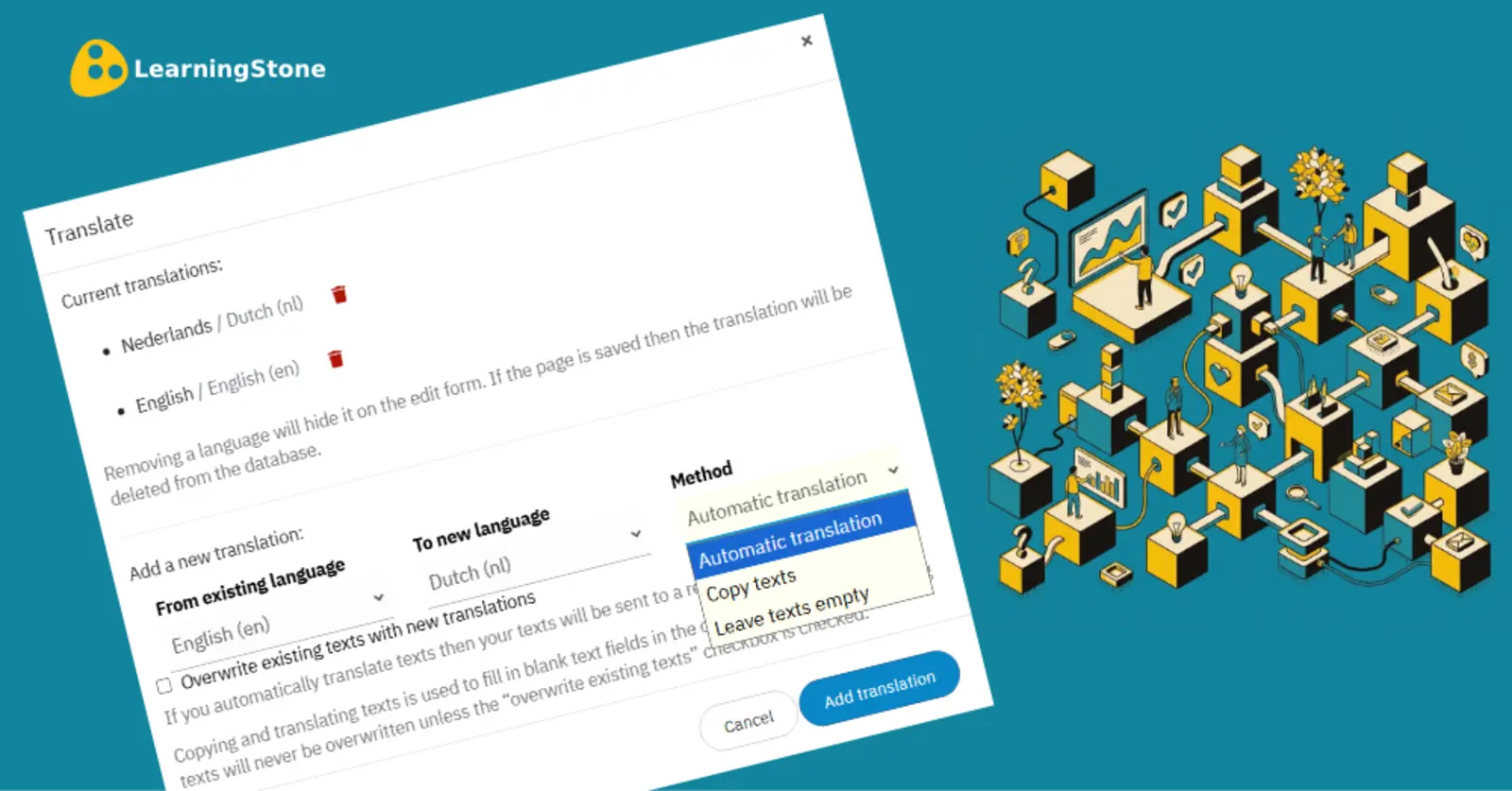
Go to a course timeline block or a public page in the workspace and select the "Language" tab. Choose "Automatic Translation" and select a language pair.

The translation is provided by the excellent AI translation service DeepL. Your texts are sent to DeepL (in Germany) but remain confidential.

Be careful when translating all blocks at once or removing a language. Consider backing up the course timeline before you begin!

And if you’ve already translated some of it yourself but would still like to have it redone, select “Overwrite existing texts with new translations”.


Interested in LearningStone Ask us for a tour!
Receive blogs per e-mail? Sign up here

Read more

Training activity: Didactic coaching - supporting learning between training days

Blended learning, Learning design, Tips & How to's

Trainers who want to make a real impact don't stop when the training day is over. Didactic coaching is a targeted approach in which the trainer stimulates participants' thinking with feedback that…

Read more about Training activity: Didactic coaching - supporting learning between training days

Training activity: End with a bang - wrap up your training in a fun and meaningful way

Blended learning, Learning design, Tips & How to's

The final phase of a training is not just a formality. It is the moment where insights crystallize, commitments are made, and participants get a tangible sense of what they have learned and achieved.

Read more about Training activity: End with a bang - wrap up your training in a fun and meaningful way

New: Progress report with colours, dates, and more

Tips & How to's, Product news, LearningStone

Trainers who actively engage with their groups know this: managing assignments and progress can quickly become a messy hassle that requires keeping track of all sorts of things. LearningStone’s…

Read more about New: Progress report with colours, dates, and more