More blog posts

Training activity: Didactic coaching - supporting learning between training days

Trainers who want to make a real impact don't stop when the training day is over. Didactic coaching is a targeted approach in which the trainer stimulates participants' thinking with feedback that motivates and promotes learning - supporting them actively in the period between sessions, focused on learning, reflection and growth.

3 b coach the gap female b

This is an article in the "Blended training activities with LearningStone" series of the LearningStone blog - for trainers who want to get more out of their learning environment. Copyright: LearningStone.

ls-yellow horizontal line LearningStone #fac112.png

Didactic coaching goes beyond delivering a training. As a trainer, you support participants in applying what they have learned in their own practice. You ask questions, give feedback on submitted assignments, monitor progress and adjust where needed - not once, but continuously. This calls for a smart setup of your learning environment, so you as a coach maintain an overview without having to chase participants every day.

With LearningStone, you can combine a training with a structured coaching environment that supports this process: from personal dialogues to progress reporting and forms for self-reflection. You can set this up for a short period after a training day, or make longer-term agreements for extended follow-up coaching.

Why didactic coaching works

Learning does not stick after a single training day. Modern research in cognitive psychology and adult education shows that people retain knowledge significantly better when learning takes place in smaller segments spread over time - and that one-off training sessions without follow-up structurally have too little effect on behaviour change in practice.

A review study on transfer in the workplace concludes that coaching, reflection and guided application in practice are the most effective ways to make learning truly stick. Coaching after a training makes a demonstrable difference: multiple meta-analyses of workplace coaching with adults show consistent, significant effects on learning and performance outcomes.

Targeted feedback also plays a key role - though researchers warn that not all feedback helps. Feedback that is too general, too late or not focused on the right content can even hinder the learning process. Didactic coaching combines all of this: spaced learning, targeted feedback and guided reflection - in an approach that is proven to work for adults in the workplace.

Sources:

Cannon-Bowers, J. et al. (2023). Workplace coaching: a meta-analysis and recommendations for advancing the science of coaching. Frontiers in Psychology, 14.

Mehner, L., Rothenbusch, S. & Kauffelt, S. (2024). How to maximize the impact of workplace training. European Journal of Work and Organizational Psychology.

Reshetnikov, V. et al. (2024). What can we know about the effectiveness of coaching? A meta-analysis based on randomized controlled trials. Academy of Management Learning & Education.

Hattie, J. & Timperley, H. (2007, continuously cited through 2024). The power of feedback. Review of Educational Research.

What you can do

Create a solo groupspace per coachee or group

In LearningStone, when creating a groupspace, you choose a "Solo Groupspace". This is the ideal environment for one-on-one coaching: the participant sees only their own environment and communicates privately with the coach. Do you have several coachees at the same time? You can place them all in the same solo groupspace - they cannot see each other, but you manage them all from one place.

Use personal dialogues for structured conversations

The "Personal Dialogues" in LearningStone are the digital coaching conversations between you and an individual participant - also available in a collaborative groupspace. You can ask questions, discuss assignments and invite reflection. The conversation is saved, so as a coach you can always look back at what was discussed before - and so can the participant.

Add forms for self-reflection and learning goals

With the forms function, you create intake questionnaires, logbooks for learning goals or interim reflection forms. You link these directly to the course timeline, so they appear at the right moment. LearningStone also offers a ready-made example: the "Logbook for learning goals", which you can copy directly from the library.

Monitor progress via the progress report

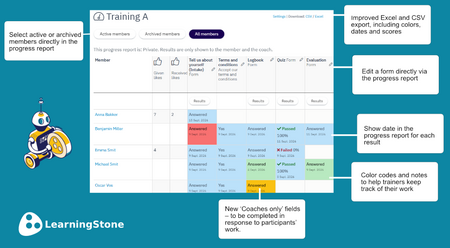
Via progress markers in the course timeline, you can see per participant whether assignments have been completed, how self-reflection questions have been answered and which grades or notes you have added yourself. You can keep the progress report private (only you and the participant can see it) or share it with a mentor. This way, as a coach, you always have a complete picture.

Schedule automatic messages between sessions

Via the course timeline, you can schedule automatic emails, wall posts or dialogues at fixed moments - or relative to the date a participant was added. Send a reflection question automatically three days after the first session, and a reminder about the assignment a week later. This keeps the learning process alive without you having to think about it every time.

Add coach-only notes

In the progress report, you can set progress markers that are only visible to you as the coach. Make notes per participant here: observations, grades, the impression after a conversation. These are your private coaching notes - visible in the report, invisible to the participant. You can also do this with the "Personal note" block.



Interested in LearningStone Ask us for a tour!
Receive blogs per e-mail? Sign up here

Read more

Training activity: End with a bang - wrap up your training in a fun and meaningful way

Blended learning, Learning design, Tips & How to's

The final phase of a training is not just a formality. It is the moment where insights crystallize, commitments are made, and participants get a tangible sense of what they have learned and achieved.

Read more about Training activity: End with a bang - wrap up your training in a fun and meaningful way

New: Progress report with colours, dates, and more

Tips & How to's, Product news, LearningStone

Trainers who actively engage with their groups know this: managing assignments and progress can quickly become a messy hassle that requires keeping track of all sorts of things. LearningStone’s…

Read more about New: Progress report with colours, dates, and more

Training activity: Summarizing content voor better retention

Blended learning, Learning design, Tips & How to's

After a training session, your head is full. But what actually stays with you? Research consistently shows that active processing - and summarizing in particular - dramatically improves learning…

Read more about Training activity: Summarizing content voor better retention